| Problems As an email server As a web server As a FAX server As a VPS/RRAS Server As an SQL server Log |
Suppressing unimportant event alerts
Questions:
---------------------------------------
An exception of type 'Type: System.Data.SqlClient.SqlException, System.Data, Version=2.0.0.0, Culture=neutral, PublicKeyToken=b77a5c561934e089' has occurred.
Timestamp: 06/20/2009 09:42:47
Message: Timeout expired.
See: http://blogs.technet.com/b/sbs/archive/2009/07/14/sbs-2008-console-may-take-too-long-to-display-alerts-and-security-statuses-display-not-available-or-crash.aspx +
Error Event ID: 10016, Source: DCOM, "The application-specific permission settings do not grant Local Activation permission for the COM Server application with CLSID {61738644-F196-11D0-9953-00C04FD919C1} to the user NT AUTHORITY\NETWORK SERVICE SID (S-1-5-20) from address LocalHost (Using LRPC). This security permission can be modified using the Component Services administrative tool." Search regedit for the CLSID. If it is for the IIS WAMREG admin service, then fsStart "Component Services", double-click on Computers, My Computer and then click on DCOM Config. From the list of objects on the right panel find the 'IIS WAMREG admin Service' and right click, select 'Properties' and click on the 'Security' tab. Under 'Launch and Activation permission' click on 'Edit', add the 'NETWORK SERVICE' and click on 'Local Activation' for the account.
Event: 12289, Source: VSS, VSS_E_WRITER_STATUS_NOT_AVAILABLE hr = 0x80042409. "VSS_E_WRITER_STATUS_NOT_AVAILABLE. An older active writer session state is being overwritten by a newer session. The most common cause is that the number of parallel backups has exceeded the maximum supported limit, Operation: PostSnapshot Event Context: Maximum supported sessions: 64 Completed sessions: 8 Active sessions: 64 Aborted sessions: 0 Writer failed sessions: 0 New snaphot set: {957a7c94-f156-4e4e-8411-22dff9590a85} Old snapshot set: {8eac8839-b361-455d-95fa-123052d76c55} Old operation: 1014 Old state: 1 Old failure: 0 Execution Context: Writer Writer Class Id: <multiple values> Writer Name: <multiple values> Writer Instance ID: <multiple values>" 15 at 5:01pm and 15 at 11:01pm which is when the main Windows backup is set to go.
Event ID 3013 Windows Search Service "a device attached to the system is not funcitoning", exclude those files from the search index, or increase the timeout: ^kb148426 SESSTIMEOUT can be 10 - 65535 seconds 45 by default in HKEY_LOCAL_MACHINE\SYSTEM\CurrentControlSet\Services\LanmanWorkstation\Parameters, but i'm not sure that applies to 2k8 as SESSTIMOUT doesn't exist unless created. created 2011/09/12 and set to 90. Had excluded the folder (\WSUS) prior to that. As of 9/13, neither change made any difference. M$ says it is (yet another) ignorable error ^
Event ID 13042 "Self-update is not working" This is VERY difficult to debug because there are many components that must be working and no information about where the failure is happening.
To recheck: C:\Program Files\Update Services\Tools>wsusutil.exe checkhealth Then look in the Applications Event Logs.
If IIS is set to use a specific server IP address for the Default web site, that can cause issues. Try "all, unassigned" if you can. The "Selfupdate" folder has to be accessable under BOTH the default web site and the WSUS admin site. It must allow directory browsing and not require authintication, and not require SSL.
Event ID 36874 Schannel - "An SSL 3.0 connection request was received from a remote client application, but none of the cipher suites supported by the client application are supported by the server. The SSL connection request has failed." This is an attempt by a browser to connect using the older SSL3.0 protocol rather than the more secure TLS. It should be ignored unless you have some very serious need to support that browser... SSL is NOT as secure as TLS so allowing those connections could compromise the server. ^ ^ ^ 2011/09/19 Disabled the error by setting the event logging value to 0 under: HKEY_LOCAL_MACHINE\SYSTEM\CurrentControlSet\Control\SecurityProviders\SCHANNEL
TaskScheduler Event ID: 706 "Task Compatibility module failed to update task "" to the required status [3|4]." Can be fixed by simply editing the scheduled task without changing anything. Not sure why that works, but it does.
Can't edit DHCP Settings; server icon shows red circle with white minus sign, and no IPv4, etc... settings show below it. Editing the Windows\System32\Driver\Etc\Hosts file to add anything that points to the IP address of the server will cause this. E.g. I had an entry in there for local testing of a web page (so I could see the error messages generated by the scripting engine which were turned off for external connections, but enabled for local connections) and as soon as I comment that out, the DHCP MMC plug in works perfectly, allowing me to see and edit the IPv4 and so on parameters. As soon as I put it back, I get the little red circle with the white minus sign on top of the server name and can't see anything under that.
Share Point Services 3 Event ID 3355 with timeout as the reason;
^
2011/11/15: start / "cmd" / right click run as Administrator, approve
cd "\Program Files\Common Files\Microsoft Shared\Web Server
Extensions\12\BIN"
stsadm -o setproperty -pn database-connection-timeout -pv 45
Running out of space on the OS drive.
http://www.howtogeek.com/50259/add-disk-cleanup-in-server-2008/
https://www.howtogeek.com/50278/disk-cleanup-in-server-2008-part-2-schedule-a-cleanup/
ToDo: Upgrading from Exchange Server 2007, SP1 to SP3 on Small Business Server 2008 (SBS2k8)
http://support.microsoft.com/kb/982423 must disable Forefront first.
http://technet.microsoft.com/en-us/library/ff607226(EXCHG.80).aspx can't upgrade? At all or does this mean one must un-install Exch2k7sp1 and then install SP3 and restore data?
http://social.technet.microsoft.com/Forums/en-US/exchangesoftwareupdate/thread/0f045327-7d0b-4454-883f-95b93bb86ec7/ This appears to indicate that it can be an update, but you must remember to run it as admin.After Start, All Programs, Microsoft Echange Server 2007, Continue:
get-ExchangeServer, Failed, Error: Active Directory server name.xxx.com is not available. Error message: A local error occurred.
get-UMServer, Failed, Error: Active Directory server name.xxx.com is not available. Error message: A local error occurred.Solve this by: Start, Run, (type in: control keymgr.dll), OK, Back up..., (type in a name) Next, (press Ctrl+Alt+Del if local, or Ctrl+Alt+End if remote)
Select each entry in the list and click Remove. Close.
In IIS 7 Manager, clicking on any of the Exchange paths under SBS Web Applications results in error: Could not find a part of the path "\\.\BackOfficeStorage\name.local\MBX". This behavior is normal and does not prevent normal operation of the system.
Under Exchange Management, Organization..., Hub Transport, on the Anti-Spam tab, the IP Allow and Block lists are not accessible. This is normal, go to Server Configuration, Hub Transport, Anti-Spam (bottom half), and access them there. +
The ForeFront for Exchange program can timeout when doing updates. There is a KB939411 that specifies a regedit fix that increases the timeout limit and allows it to finish. You will see security warnings in the summary network report and the detail will show "At least one of the engines enabled for updates has not been updated in the last week." In the event log, you will see "Error: The <EngineName> scan engine update timed out" or like that from source GetEngineFiles, event ID: 6014 error code 0x80004005. Already set to 3300.
The ForeFront for Exchange program can timeout when doing real time scans of incomming messages. ^ The setting can be modified in HKEY_LOCAL_MACHINE\SOFTWARE\Wow6432Node\Microsoft\Forefront Server Security\Exchange Server. Because this is a hidden registry value, you must create a new DWORD registry value called RealtimeTimeout, set the Base to Decimal, and type the time in milliseconds in the Value data box. default is 5 minutes or 300,000 milliseconds. Recycle the Exchange and Forefront Security for Exchange Server services for the change to take effect. 20110921 changed to 600000. Wait for next server restart.
- http://www.kreslavsky.com/2008/06/outlook-status-shows-disconnected.html Tried adding "Maximum Allowed Sessions Per User" to HKEY_LOCAL_MACHINE\SYSTEM\CurrentControlSet\Services\MSExchangeIS\ParametersSystem and set value to 40 (decimal).
James Newton of MassMind replies: The kreslavsky fix did not help. As per http://social.technet.microsoft.com/Forums/en-US/smallbusinessserver/thread/037d02f2-dbf3-4a43-b161-eade299b05ff Trying KB830836 +
Kaspersky downloads but does not install. GetEngineFiles Event ID: 6014 0x80004005 \Program Files (x86)\Microsoft Forefront Security\Exchange Server\Data\ProgramLog.txt shows: GetFileCommand "Error: 13. File exists" NOT a timeout. +http://social.technet.microsoft.com/Forums/en-US/FSENext/thread/320a0c78-ed6d-42e2-9345-cd54d1b5fc03 Under \Program Files (x86)\Microsoft Forefront Security\Exchange Server\Data\Engines\x86\ I renamed Kaspersky5 to Kaspersky5OLD (had to wait for one of the scheduled update attempts to finish before it would let me), and under the hidden folder C:\ProgramData\ I renamed Kaspersky SDK to Kaspersky SDK OLD and then manually updated. Appears to be ok now.
There is also a ProgramLog.txt file with more detailed information which may be helpful in troubleshooting Forefront errors at: C:\Program Files (x86)\Microsoft Forefront Security\Exchange Server\Data
Microsoft Forefront Protection Event ID: 7009 Event Details: None of the antimalware engines selected for transport scanning have been initialized.
FSCTransportScanner Event ID: 5314 Event Details: Could not initialize X properly. As a result the system will not function. Please check the X engine and signatures.
https://support.microsoft.com/en-us/kb/2919357 Apparently caused by memory fragmentation.FSEAgent Event ID: 8048 "# messages have been archived and purged due to an error while scanning. Please ensure that mail is not queuing." Correct by removing "stuck" emails in the Forefront for Exchange "Undeliverable" folder. That is C:\Program Files (x86)\Microsoft Forefront Security\Exchange Server\Data\Archive\Undeliverable\in by default.
http://blogs.technet.com/b/msfss_stuff/archive/2009/09/24/issue-of-the-week-9-24.aspxThe BPA for Exch says HKEY_LOCAL_MACHINE\SYSTEM\CurrentControlSet\Services\Tcpip\Parameters\TcpTimedWaitDelay should be 60^ and it is currently -1 which some say is the same as 120^ and should be 30. Leaving alone for now. We aren't under heavy load.
When viewing a recieved email (in Outlook 2003) which DOES have an attached file, no attachment is shown. The attachment appears when 1. forwarding the email (before actually sending) 2. viewing the same email on a cell phone or via Outlook Web Access 3. after forwarding the email to oneself.
https://support.microsoft.com/kb/954684 says to set-OrganizationConfig -ShowInlineAttachments:$true from the Exchange Management Shell which seems to be accepted on 2014/11/24.Changing which attachements can be opened directly from OWA: From Exchange Management Console, open Server Configuration, Client Access, Outlook Web Access, double click the listed web site, then go to the Public Computer File Access tab. Under Customize direct file access, click Customize... and add extensions or mime types to the lists.
http://www.msexchange.org/articles-tutorials/exchange-server-2007/security-message-hygiene/outlook-web-access-security-features-part4.htmlAfter migration to Office365, local Outlook program still connects to local Exchange server: There are multiple easy to find and fix DNS and other setup issues which can cause this, but even after doing everything right, e.g. ping autodiscover.yourdomain.com is NOT going to your own server, outhouse will still connect internally. That is a serious bug.
Usually this results in error messages like "The resource that you are trying to use is located on an unsupported version of Microsoft Exchange." (if the old server is old enough) or repeated prompts for a password (if the office365 account password is different) or most critically, to email not showing up because it's going to the new server, not the old.
Diagnosis:
https://community.rackspace.com/products/f/28/t/4030
Run outlook. In the system tray, find the Microsoft Outlook icon, and hold down Ctrl while right clicking. Select "Test Email Autoconfiguration...". Enter user email and password, and select only "Use Autodiscover" then press "Test". Notice that it first tries
https://yourdomain.com/autodiscover/autodiscover.xml
before it tries:
https://autodiscover.yourdomain.com/autodiscover/autodiscover.xml
so it doesn't matter if autodiscover.yourdomain.com CNAMES to an outlook.com server... it will find your local server first.
The fix:
http://prakash-nimmala.blogspot.com/2014/10/outlook-clients-are-still-pointing-to.html
change the "AutoDiscoverServiceInternalURI" parameter from "https://server.yourdomain.com/Autodiscover/Autodiscover.xml" to $NULL with the Exchange Shell command:
Set-ClientAccessServer -identity "ts500" -AutoDiscoverServiceInternalUri $NULL
You can check the setting with:
Get-ClientAccessServer | Select Name, *internal* | flYou will still have to create a new profile using the Mail item under Control Panel. The old profile will work, but will still /partially/ connect to the old server (for things like out of office setting). The good news is that most settings are retained from your online account. One exception is the default signatures to use for new mails or replies... you must choose those again.
Cleaning old emails out of the Exchange 2k3 Server:
In Exchange Management Shell:
Export-Mailbox -Identity UserID -IncludeFolders '\Deleted Items' -StartDate 01/01/2017 -DeleteContent
404 when requesting a file that does exist from a working site: Running IIS7, you put a file in a folder from which other files are clearly available to remote browsers, and the browsers return a 404 error when requesting that file: KB396265 {broken link} describes why this happens in IIS6 and explains how to correct it. In IIS7, the mime mapping is per directory, in the features view for that folder. Just add a mime mapping and ensure it has a valid type. E.g. if you want to download .exe files from a folder add application/octet-stream as the mapping for .exeIf you get a 404.2 on a cgi-bin .exe, open the IIS manager, click on the main icon for the server on the left, then on "Edit ISAPI or CGI Restriction", add a new entry (far right action list) and enter the full path and filename of the .exe, and click on "Allow extension path of execute".
If you are trying to figure out which log file directory belongs to which web site, go to the IIS control panel, select the web site, open "Advanced Properties" and note the "Site ID". Next, double click "logging" then click on "show log files" in the upper right corner. The log files for this site will be in the sub-folder named "W3SVC" plus the site ID. E.g. the site with ID 1, is logging to the W3SVC1 folder.
Multiple sites with seperate self issued SSL certs on one IP address: (done 2011/07/20 and it hasn't exploded yet)
- In IIS Manager, Connections, select your server, then go to "Features View" (lower left corner of center screen), and double click "Server Certificates". In the Actions panel, click "Create Self-Signed Certificate..." and enter a Friendly name starting with a "*" such as *site1 then click Ok. The new cert shoudl appear in the list of certificates. If you get an Access Denied error, allows Administrators full access to C:\ProgramData\Microsoft\Crypto\RSA\MachineKeys
- In your web site setup, Actions panel, Bindings, Add, and change type to https: then select the certificate (again, the friendly name /must/ start with a *) and the Host name: field will re-appear. Enter the host name for your site. e.g. site1.com. Because the IIS Manager GUI will change all the sites bound to that IP address and port, temporarily change the port to 444 instead of 443, then click Ok and confirm. You should NOT get a message about another domain sharing that binding.
- Now open %windir%\System32\inetsrv\config and edit applicationHost.config. Search for bindingInformation="*:444 and change the 444 to 443. File / Save.
Always give your certificates a friendly name starting with a "*". You can edit the friendly name: Launch the Microsoft Management Console (MMC) Select Start –> Run. Type in “MMC” and hit enter. From the console, select File –> Add / Remove Snap-in. Select Certificates from the Add / Remove dialog. Select Computer Account when prompt for which certificates the snap-in will manager. Select Local Computer when prompted. Click OK to add the Snap-in to the MMC. Locate your SSL certificate. For self-signed (SELFSSL), look in Personal. For installed / purchased, look in the appropriate folder the certificate was originally installed in. Right click on the certificate and select properties. Edit the Friendly Name field so the name starts with an *.
M$ lists NO fax modems for 2k8. On the list of approved modems, 2k8 isn't an option:
http://www.windowsservercatalog.com/results.aspx?bCatID=1459&cpID=0&avc=10&OR=1
(see the lower left corner under "processor architecture" and note that there are no entries for Windows Server 2008.)USR says they support 2k8. The USR3453 "Courier V. Everything External" has the "best track record" with SBS 2k8.Note that this is not meant to imply that it will actually work reliably
http://www.usr.com/support/s-windows-2008.asp?loc=Incomming FAXes not being routed to email? See "KB973640"+
After running just fine for a few days, email notification of faxes becomes intermittant. Some faxes appear, others don't. In the event viewer, applications log, you find a repeating sequence of events. 32083, 32089, 32078. Restarting the fax service, or the server, causes the problem to go away for a few days.
http://blogs.technet.com/b/sbs/archive/2009/05/28/sbs-2008-fax-routing-to-email-fails-with-the-following-error-occurred-0x80040211.aspxThere are many cases of FAXes being recieved, reciept acknologed to the sender, but then not actually routed via email or saved in the folder. M$ is ignoring these problems.
GFI says they support a fax server solution for 2k8:
http://www.gfi.com/faxmaker
In "remote web workplace" the "connect to a computer" button is not
showing
1. You must use Internet Explorer. Chrome, Firefox, Safari, etc... do not
support this functionality.
2. As an update for Internet Explorer 11 users, you need to click the "gear"
icon at the top right, click "Compatibility View Settings", and then click
"Add".
3. IE is NOT available in Windows 11. It is in Windows 10, but although you
can install it in Win11, it will not run. However, there is an IE mode in
the Edge browser which might
work:
https://windowsreport.com/internet-explorer-windows-11
Setting up VPN in Windows 10/11
The VPN type can be PPTP, etc... Encryption should be required and MS-CHAPv2 protocol should be used. Check that NETBIOS of TCP/IP is enabled.
Adding workstations to the domain:
From a client computer when adding it to the domain: "Multiple connections
to a server or shared resource by the same user, using more than one user
name, are not allowed" Make sure there are no mapped drives, net use, or
other access to server resources while joining the domain.
^
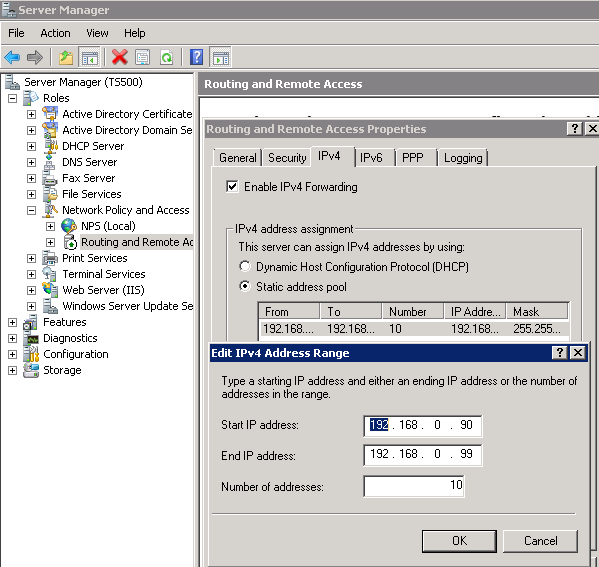
No access to http://connect web site. Client computer can ping server, but server can't ping client. Add the append DNS suffix of domain.local to TCP/IP protocal, Advanced, DNS in client network adapter. Also, on adapter Advanced tab (not under TCP/IP) Windows Firewall, Settings, Exceptions, turn on Remote Desktop, UPnP Framework, and File and Printer sharing.Windows XP (virtual or real) machines suddenly can't VPN. Known good VPN config on the XP box connects, validates, and appears to be working, but IP address is invalid, and no data is transferred from the server to the workstation. On the server, the log says there are no entries available in the DHCP pool. DHCP appears to be working perfectly for local workstations. Workaround: Configured RRAS to use a seperate static IP address pool. Right click Routing and Remove Access, then select Properties. IPv4 tab, under IPv4 address assignments, select Statis address pool and add or edit a range of IP addresses known to be free (e.g. NOT those assigned to DHCP). (picture) This may be happening because RRAS wants 10 IP's from DHCP no matter how few VPN clients there are. If DHCP is configured for a very small network (e.g. fewer than 10 available), it may fail to release any IPs to RRAS.
Use Microsoft SQL Server Management Studio Express to connect to the databases.
http://www.cs.trinity.edu/~thicks/Tutorials/MSSQL-Server-Management-Studio-Import-Export-Backup/Import-Export-Backup-MSSQL-Database.html How to backup, restore, etc... Note that the SQLServer2005MSSQLUser must have full permissions for a folder from which it will import or restore data.
To export or import data, use the scripting commands. e.g.
BULK INSERT database.dbo.table
   FROM 'D:\temp\sqlimport\file'
   WITH  (
      FIELDTERMINATOR ='","',
      )
  ;
Note that the user SQLServer2005MSSQLUser#databasename must have full permissions for a folder from which it will import or restore data.
netsh int tcp set global congestion=none+
netsh int tcp set global autotuning=disabled
netsh int tcp set global rss=disabled
netsh int ip set global taskoffload=disabled
dnscmd /Config /EnableEdnsProbes 0
in accordance with SBS2k8 Best Practices Analyzer.
2020/10/20 Installed KB4074621. In exchange shell: New-ExchangeCertificate -DomainName mail.efplus.com and replaced web cert. Deleted old StartSSL expired certs
2020/10/21 Cleared Teri's old emails out of the system.
Comments:
See also:
USE SUSDB
GO
exec spGetObsoleteUpdatesToCleanup
and click Execute. This will return a list of obsolete ID's. For each one Execute
exec spDeleteUpdate @localUpdateID=000000
where 000000 is the ID. If those timeout, Right click on
\\.\pipe\mssql$microsoft##ssee\sql\query (first in the row on the left),
Select Properties, Select Connections, Set timeout from default 600 to 0
(= no timeout)
Once a few have been completed, you should be able to run the standard cleanup
tool.
EventID: 1 from UAC Event Details: "The process failed to handle ERROR_ELEVATION_REQUIRED during the creation of a child process." Happens at 12:43 AM, 3:43 AM, 6:43 AM, 9:43 AM and then 12:43 PM, 3:43 PM, 6:43 PM, 9:43 PM every day. Nothing in the task scheduler happens with that sort of schedule. No idea what causes this. +
20191028 Installed
https://downloadcenter.intel.com/download/22194/Intel-Rapid-Storage-Technology-Intel-RST-User-Interface-and-Driver?product=55005
to gain access to the RAID information and asses hard drive
health.+
| file: /Techref/os/win/2008sbs.htm, 39KB, , updated: 2022/9/1 09:26, local time: 2025/10/26 22:59,
216.73.216.188,10-3-157-36:LOG IN
|
| ©2025 These pages are served without commercial sponsorship. (No popup ads, etc...).Bandwidth abuse increases hosting cost forcing sponsorship or shutdown. This server aggressively defends against automated copying for any reason including offline viewing, duplication, etc... Please respect this requirement and DO NOT RIP THIS SITE. Questions? <A HREF="http://www.ecomorder.com/techref/os/win/2008sbs.htm"> Windows Server 2008 Small Business Server (x64)</A> |
| Did you find what you needed? |
Welcome to ecomorder.com! |
|
Ashley Roll has put together a really nice little unit here. Leave off the MAX232 and keep these handy for the few times you need true RS232! |
.